
The Market Doesn't
Destroy Traders.
Their Emotions Do.
A Trade Worth Taking
Outside Your Plan
This Is What You Actually See
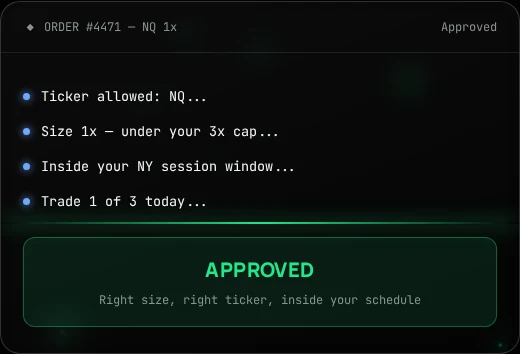
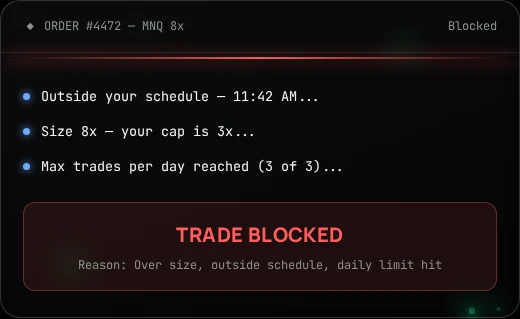
Your Guardian Steps In
Your Guardian Never Sleeps
Session Windows
Your trading hours in EST. Outside them, new orders are refused.
Ticker Lock
Only the symbols you approved. Anything else is stopped at the order.
Contract Sizing
A hard max that counts your full position, adds included. 1 NQ = 10 MNQ.
Order Gate
A full-screen block over your broker before the order ever fills.
Session Lockout
Push past your rules three times and Guardian locks you out of the session.
Loss-Limit Backup
Guardian remembers your daily loss number even if you delete it at the broker.
Protection before you break the rules
Create Your Account
Sign up, open your dashboard, and pair your browser with Guardian.
Set Your Rules
Trading schedule in EST, allowed tickers, and contract sizing. That's your rulebook.
Guardian Watches
Guardian reads your broker's live position feed on Tradovate, TradeSea, and TradingView.
Orders Get Blocked
Break a rule and the order is refused with a full-screen gate — before it fills.
Three rules. Enforced at the order.
Trading Schedule
Set your session window in EST. Outside it, orders are refused — you can still open charts in Watch-Only mode, but you can't trade.
Allowed Tickers
Pick the symbols you're allowed to trade. Anything else gets stopped at the order, on every supported platform.
Contract Sizing
A hard max size that counts your whole position — including adds. Micros and minis are converted for you (1 NQ = 10 MNQ).
Guardian also keeps a backup record of your daily loss limit and profit target. It will not close a position for you — set those on your broker or prop firm. But if you delete the limit at your broker and try to trade after you already hit it, Guardian still refuses the order.
Runs in your browser, on the platforms you use
Guardian is a Chrome extension. It reads your live position feed and blocks orders that break your rulebook. It is read-only — it never places a trade for you.
Questions worth answering
Do you have access to my trading account?
No. Guardian runs in your browser, reads what's already on your screen and your broker's live feed, and never places or closes trades for you. We hold no funds and no broker credentials.
Which platforms work right now?
Tradovate, TradeSea, and TradingView.
Can Guardian actually block a trade?
Yes. When an order breaks your schedule, ticker, or size rule, Guardian refuses it and shows a full-screen gate before it reaches the exchange.
Does Guardian close my position when I hit my daily loss?
No. Set your real daily loss limit and profit target on your broker or prop-firm account — those take you out. Guardian is the safety net: once it sees you hit your number, it stops you from opening new trades, even if you delete the limit at your broker.
What if I trade outside my schedule?
You get a gate with one option: follow your rules. Push it three times and Guardian locks you out until your next session. You can still view charts in Watch-Only mode.
Is TradeGuardian a broker or a prop firm?
No. It's a discipline tool — software that enforces the rules you set for yourself. No funding, no signals, no financial advice.
Activate Your Guardian
Be first in line. We'll email you the moment Guardian opens up.